 EasyMousefor Mac
Free · macOS 14 or later
Switch mice.
Your settings follow.
You can save sensitivity and scroll direction for each mouse, and EasyMouse applies the right profile for the mouse you’re using.
- Free
- macOS 14 or later
- Apple silicon · Intel
- No account
Downloads left today
FreeChecking how many downloads are left.
Checking how many downloads are left.
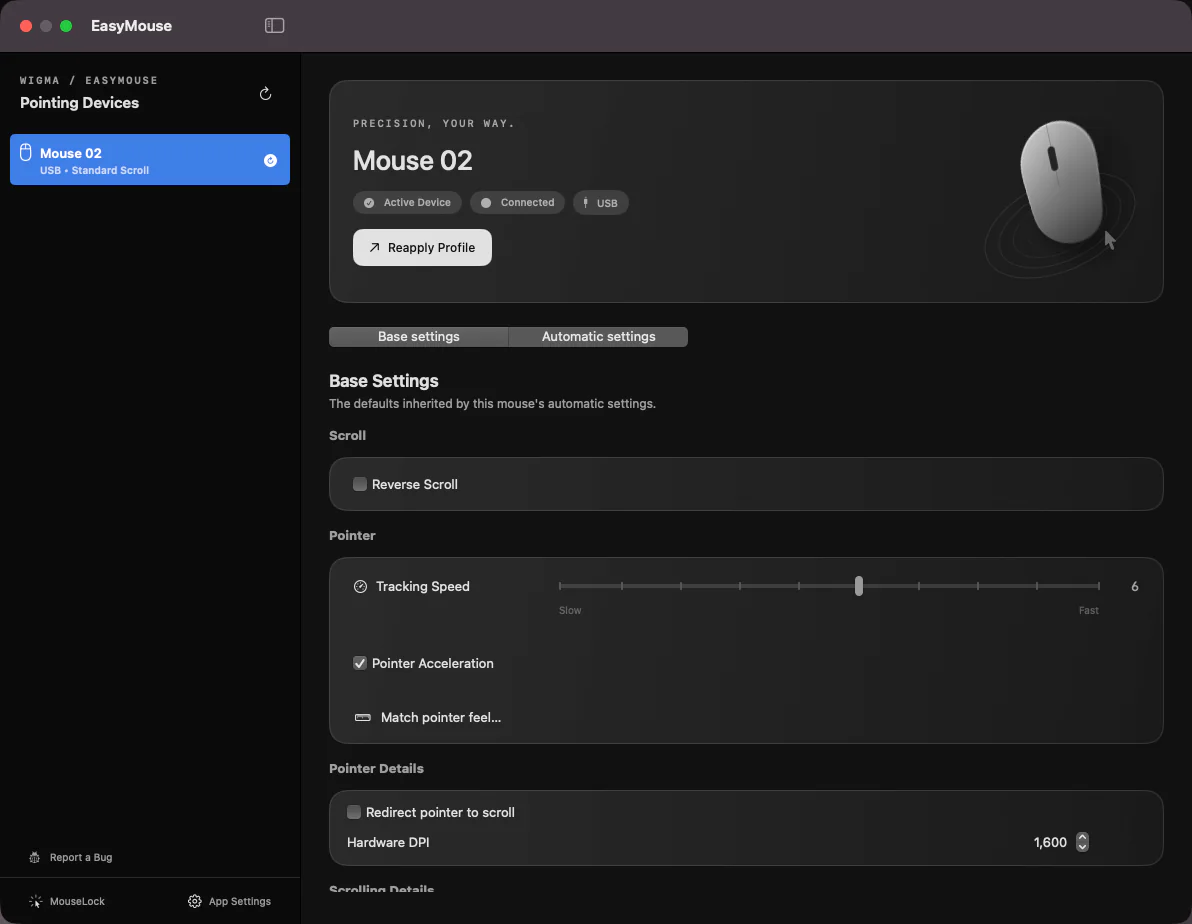
Actual app screens
These three screens cover everyday settings.
Base settings, automatic settings and the menu bar. Everything you use often is in one of them.
Each mouse gets its own settings.
You can set pointer speed and scroll direction for each device in one place.
Video
Meet EasyMouse in 24 seconds
Real app screens with explanatory graphics show the main features.
No sound. Real app screens with explanatory animation.
What changes
Each mouse keeps its own settings.
- 01
Switch mice without readjusting.
You can save one profile for the mouse on your desk and one for the mouse you carry. EasyMouse applies the right one for the mouse you’re using.
- 02
Each mouse can have its own scroll direction, too.
You can turn scroll reversal on or off for each mouse. You don’t have to open System Settings every time you switch.
- 03
The cursor stays on one screen while gaming.
If you turn on MouseLock when you game across several monitors, the cursor is less likely to slip onto another screen.
Advanced features
Fine-tune it when you need to.
The basic settings cover most days. You can tune things further for work or games.
Settings by app and display
Sensitivity, scrolling and buttons switch automatically with the app or display you are using.
Buttons and gestures
Assign Mission Control, Spaces, back and forward, shortcuts or media keys to buttons and the wheel. Long presses and press-and-swipe gestures can do different things.
Smooth scrolling
Tune distance, speed, acceleration and momentum per device, and use modifier keys to change direction or speed.
Precision mode and auto scroll
Hold a button to slow the pointer for detailed work, or use auto scroll to move through long documents.
Hardware options on supported mice
Some Logitech and ELECOM mice expose hardware DPI, high-resolution wheel and extra-button options. Support depends on the model and firmware.
Recommendations and checks
Compare and try recommended settings, match pointer feel and check button or scroll problems. Your saved settings stay in place until you choose to save.
How it works
Free to download and use.
EasyMouse is free. Download it without an account or registration, use it right away and get updates inside the app. No time limit, no limit on the number of Macs.
- Free, with no time limit and no limit on the number of Macs. No account or registration needed.
- The app announces updates and installs them in place. In-app updates never count against the web download limit.
- Anonymous usage statistics and bug-report diagnostics are your choice at first launch. Declining never limits any feature.
- Works offline. The internet is used only to check for updates and, if you agree, to send statistics.
- Needs the macOS Accessibility and Input Monitoring permissions to work.
- Requires macOS 14 Sonoma or later.
- Runs on both Apple silicon and Intel-based Macs.
Frequently asked questions
Is it free to keep using?
Yes. EasyMouse is free, with no time limit and no limit on the number of Macs. Download it and use it right away, without an account or registration. The app and this website may show a small card, labeled "Ad", introducing other services made by Wigma.
Which Macs can run EasyMouse?
macOS 14 Sonoma or later. One universal build supports both Apple silicon and Intel Macs.
Why does it need Accessibility and Input Monitoring?
Applying pointer and scroll settings per device and triggering side buttons or shortcuts requires permission to handle input events. You grant and revoke it yourself in System Settings under Privacy and Security.
Why are downloads limited to three a day?
It helps keep the free download server running reliably. Each network connection (IP address) can download up to three times a day, and the count resets at midnight Korea time. Updates for an installed app are delivered inside the app and never use this count.
What information is collected?
At first launch you choose whether to send anonymous usage statistics and bug-report diagnostics. Only if you agree does the app send anonymous information such as app version, macOS version and device type. IP addresses, device identifiers, user names and file paths are never collected. The privacy page lists every field.
Does it work offline?
Yes. Settings are stored on your Mac and every feature works offline. The internet is used only to check for updates and, if you agree, to send statistics.
Guides
Popular guides
Reverse Mac mouse scrolling without changing your trackpad
Keep natural scrolling on your trackpad and reverse just your mouse wheel. Learn how to set per-device scrolling in EasyMouse and what permissions it needs.
Set up Logitech mouse buttons on Mac without Options+
Configure your Logitech mouse on Mac without Options+. Set button shortcuts, scrolling and per-app settings with EasyMouse, and check what your model supports.
Assign back, forward and shortcuts to Mac mouse buttons
Make your Mac mouse side buttons useful with EasyMouse. Assign back, forward or keyboard shortcuts, then test and save settings for the apps you use.
Disable mouse acceleration and adjust pointer speed on Mac
Turn off mouse acceleration. Use EasyMouse to disable acceleration per device and adjust pointer speed on macOS.
Keep your Mac gaming cursor on one display with MouseLock
Set a screen boundary when your gaming cursor slips onto a second monitor. Learn how to set EasyMouse MouseLock boundaries and test temporary release with Escape.
Use different settings for each mouse on Mac and switch automatically
macOS keeps one set of mouse settings for every mouse. Learn how EasyMouse saves settings per mouse and trackpad and switches to them automatically when you change devices.
Free
It’s free to download.
One universal DMG installs on both Apple silicon and Intel Macs. Up to three downloads a day.
Download free